CarbonVM / Windows x64
The CarbonVM client.
Inspect a marked binary, configure its regions, and review the build request in one native workspace. Server-supplied settings define the choices and limits available to your session.
Professional $200 / month View plans
Scroll across to inspect the full workspace.
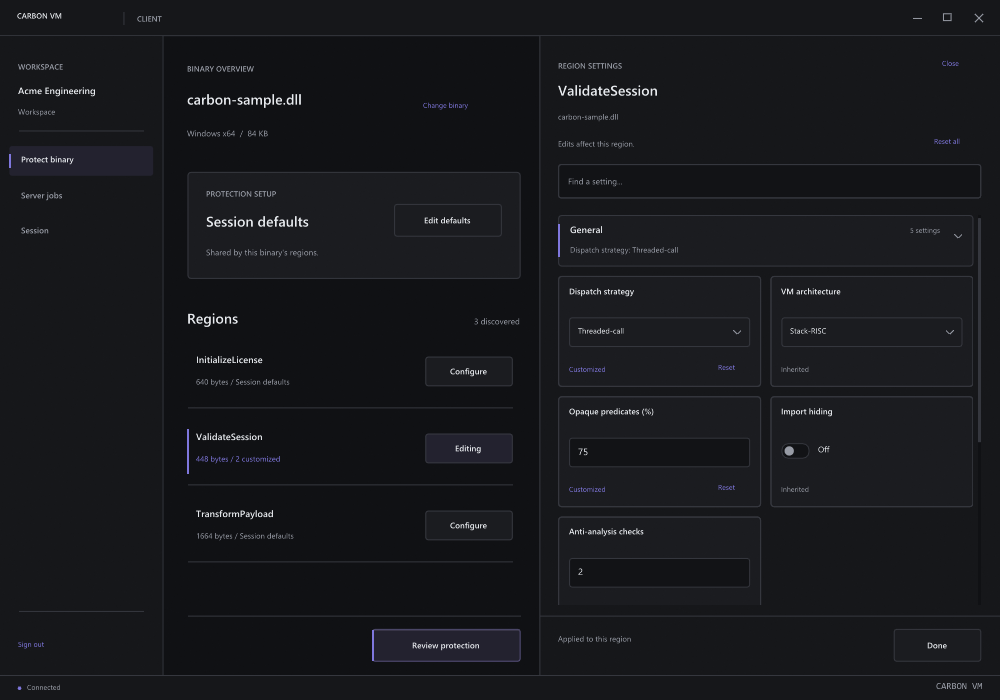
Configuration
Set a baseline, then adjust a region.
Shared defaults give the binary's marked regions a common starting point. An individual region can override a specific field while continuing to inherit the rest. Resetting that field restores the shared value.
The client keeps the region list alongside the inspector, so each change stays attached to the code region it affects. Replacing the input clears the previous binary's overrides.
Supplied by your session
After credentials and authenticator verification, the server supplies the available settings, defaults, choices, and limits. The client uses those descriptors to organize the General, Architecture, Encryption, Execution, and Bytecode controls.
Shared opaque-predicate value
Illustrative configuration with sample regions. Available values and limits depend on the authenticated session.
From input to output
A build request you can review.
The desktop client handles selection, configuration, and submission. Protection processing takes place on the server, and the client follows the resulting job.
-
01 / INPUT
Select a marked binary
Choose a Windows x64 executable or DLL containing Carbon-marked regions. The workspace lists the regions discovered in that input, with their names and byte extents for inspection.
-
02 / REQUEST
Review and submit
Review the selected regions and resolved settings before upload. The request includes the binary and its configuration; server validation determines whether the selected build profile can accept it.
-
03 / RESULT
Follow the job and save
Job status stays available in the client. A supported successful experimental build returns an artifact for verification and an explicit save action. Validation failures are reported through the job.
Result verification
Checks before the save action.
For the current experimental profile, the client checks the returned artifact against the submitted request. Receipt or integrity failures stop the result from becoming a saveable output.
These checks bind a result to its build request and detect inconsistent delivery. Application-level testing remains part of validating any protected binary for your own workload.
- 01 Submitted input
- The receipt must reference the submitted job and input hash.
- 02 Settings binding
- The settings hash must match the configuration submitted for that job.
- 03 Region coverage
- The receipt's requested and completed coverage must agree, with a non-empty region manifest.
- 04 Output integrity
- Delivery metadata must stay consistent across chunks, and the complete output must match its declared SHA-256 hash.
Compatibility and availability
Review the current build scope.
Development access currently uses an experimental Debug VM profile with limited instruction coverage. General production protection and broader runtime support remain in development.
Discuss your intended binary and release workflow with us before choosing CarbonVM for a production workload.
- Platform
- Windows x64. Marked PE executables and DLLs are inspected by the client and validated by the server.
- Experimental executable path
- The Debug VM profile supports a bounded set of operations. Unsupported instructions or inputs can be rejected during validation.
- General production protection
- In development. Configuration controls do not establish that every runtime choice is production-ready.
- Result handling
- The client checks source and settings bindings, output hashes, and selected-region coverage before offering a verified result to save.
Discuss your intended binary and release workflow with us before choosing CarbonVM for a production workload.
Account access and authenticator setup
Native sign-in uses account credentials and an authenticator code. An account without a linked authenticator can complete first-time enrollment during native sign-in. The workspace loads its server-supplied configuration after verification.
Website registration uses the invitation supplied after an access application is approved. Personal and Professional access and current build compatibility can be discussed before subscribing.
Request development accessPersonal / Professional / Enterprise
Choose your CarbonVM access.
Personal is $30 per month and Professional is $200 per month. Enterprise requirements are discussed individually. Access applications let us review your intended workload against the current development build.